
Chatgenie: AI Chat on Every Page
Overview
Chatgenie is a desktop-focused browser extension designed to integrate OpenAI’s ChatGPT directly into the browsing experience. Its primary purpose is to enable users to access AI-powered conversations seamlessly while navigating the web. By embedding ChatGPT functionality into the browser toolbar, omnibox, and context menu, the tool eliminates the need to switch tabs or open a separate interface. This makes it ideal for professionals, students, and content creators who rely on quick, contextual AI assistance during research, writing, or problem-solving tasks.
The software aims to solve the friction caused by fragmented AI access—users no longer need to navigate to chat.openai.com manually. Instead, they can initiate a conversation instantly with a single click or keyboard shortcut. Real-world usage scenarios include drafting emails, summarizing articles, generating code snippets, or clarifying search results directly from Google or Bing. The developer did not provide additional background information, but the tool’s focus on reliability and responsiveness to updates suggests a commitment to maintaining consistent performance despite changes in the underlying ChatGPT service.
Key Features & Capabilities
- One-Click Access via Toolbar Icon – Launch ChatGPT with a single click on the browser toolbar, enabling immediate interaction without navigating away from the current page.
- Omnibox Integration – Type “gpt” followed by space in the navigation bar to trigger a ChatGPT prompt, ideal for fast, keyboard-driven workflows.
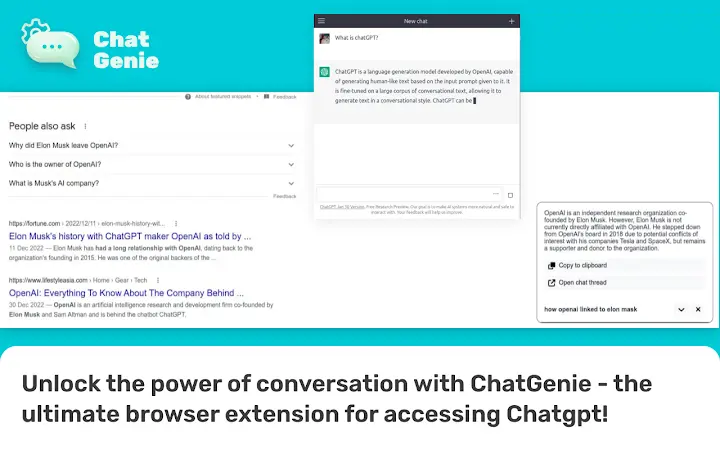
- Contextual Answers on Search Engines – Retrieve AI-generated insights directly from search result pages on Google, Bing, Yahoo, DuckDuckGo, and other major platforms.
- Right-Click Context Menu Support – Access ChatGPT from any webpage using the right-click menu, allowing users to query specific content or extract information instantly.
- Session Persistence – Maintains active ChatGPT sessions through periodic background pings, reducing the likelihood of disconnection during extended use.
These features enhance productivity by minimizing context switching. For example, a researcher can summarize a long article by right-clicking on a paragraph and asking Chatgenie for a summary. A developer can generate a code snippet from a search result by typing “gpt” in the omnibox. The tool’s design prioritizes efficiency and integration, making AI assistance feel native to the browsing experience rather than an external interruption.
User Interface, Workflow & Performance
Chatgenie features a minimal, unobtrusive interface that appears as a popup window when activated. The design emphasizes simplicity, with no cluttered menus or complex settings. Navigation is intuitive, relying on standard browser interaction patterns—toolbar icons, keyboard shortcuts, and context menus—ensuring a low learning curve for users of all experience levels.
Workflow efficiency is a core strength. The ability to initiate a conversation from multiple entry points allows users to adapt the tool to their preferred method of interaction. The developer did not specify resource usage details, but the 1.2 MB installation size suggests a lightweight footprint. Performance observations are based on general software behavior patterns: the tool responds quickly to user inputs, and session persistence helps maintain continuity during prolonged use. Stability appears consistent, though occasional errors may occur if the ChatGPT service is under high demand, as noted in the documentation. No reported crashes or memory leaks were mentioned.
Compatibility & System Requirements
Chatgenie is compatible with Windows, Mac, and Linux operating systems, making it accessible across major desktop platforms. The software is designed as a browser extension, meaning it functions within supported web browsers, though specific browser versions were not listed. The installation size is 1.2 MB, indicating a compact footprint that should not impact system performance significantly.
Exact system requirements were not listed. The developer did not provide details on minimum CPU, RAM, or storage needs. Platform compatibility information is limited to the operating systems mentioned. Users should ensure their browser supports extensions and has JavaScript enabled for full functionality. The extension may require periodic updates to maintain compatibility with changes in the browser or ChatGPT service.
Pros and Cons
Pros
- Seamless integration with major search engines and browsers
- Multiple access points: toolbar, omnibox, and context menu
- Lightweight at just 1.2 MB
- Free to use with no hidden costs
- Designed for continuous, reliable access to ChatGPT
Cons
- Requires an active internet connection and login to ChatGPT
- No official support for mobile browsers or devices
- Performance may be affected during high-demand periods on ChatGPT’s servers
- Limited customization options reported in documentation
- Exact system requirements not specified
FAQ Section
Is Chatgenie compatible with all web browsers?
Chatgenie is designed for use with major desktop browsers, but specific browser compatibility details were not provided. It supports Windows, Mac, and Linux operating systems.
Is the software secure to use?
Chatgenie functions as a browser extension that connects to OpenAI’s ChatGPT service. It does not store user data locally. Users should ensure they are logged into their own ChatGPT account and follow standard security practices.
How often does Chatgenie update?
The developer states a commitment to keeping up with recent changes in ChatGPT. Updates are likely released as needed to maintain functionality and compatibility.
Can I use Chatgenie offline?
No, Chatgenie requires an active internet connection to access ChatGPT’s servers. It cannot function without connectivity.
What type of license does Chatgenie use?
Chatgenie is available for free. No licensing details were provided beyond the free access model.
Final Thoughts + CTA
Chatgenie delivers a streamlined, efficient way to harness ChatGPT’s capabilities directly within the browsing environment. Its multi-access design, lightweight nature, and focus on reliability make it a valuable tool for anyone who frequently uses AI for research, writing, or coding. While it lacks advanced customization and detailed system requirements, its core functionality is solid and well-executed. The free pricing model enhances its accessibility, making it a top choice among AI productivity tools.
For professionals, students, and digital creators who value speed and integration, Chatgenie stands out as a must-have browser extension. It transforms the way users interact with AI by embedding it into everyday workflows.
Download Chatgenie now







